Quick answer
WhatsApp auto-replies answer incoming messages on your behalf. The Business app is a free start for a small team. A knowledge base, order lookups and a shared inbox need the WhatsApp Business Platform (API), where the 24-hour window and template rules apply.
What tool should you use for WhatsApp auto-replies?
Two tools, two different jobs. The WhatsApp Business app runs on a phone or tablet and offers fixed rules: quick replies, a greeting message and an away message. The WhatsApp Business Platform connects the number to a server through Meta. Messages land in a shared inbox, and the assistant writes the reply.
Setting up WhatsApp auto-replies on the app is simple. Download it, verify the number, write the quick replies, and you are done. The trade-off is the missing shared inbox. The app has no assignment or handover flow, quick replies stay inside the app, and you cannot connect a knowledge base or an order source. If most questions are "what time do you open" and "where are you", that may be enough.
The API takes more work. The number is connected to a Meta Business account, business verification and app permissions are completed, and the channel is approved. In return, messages from several agents land in one inbox, replies come from the knowledge base, and order status can be read when an order source is connected. YanıtLabs uses this path and connects through Meta's own approval screen. Meta's WhatsApp Business Platform documentation describes the limits of both approaches [1].
There is a third path: unofficial libraries that reverse-engineer a personal WhatsApp account. They violate Meta's terms and put the number at risk of restriction. They look cheap in the short term; losing the number is expensive later.
The reply text in WhatsApp auto-replies also depends on the path. In the app, quick replies are short and single-purpose: "We are open 09:00–18:00." On the API side, the assistant builds the answer from sentences in the knowledge base, so you fix the source rather than rewriting the message. After a wrong answer, editing one knowledge-base sentence is usually faster than changing a template.
What is the difference between the Business app and the API?
| Criterion | Business app | Business Platform (API) |
|---|---|---|
| Where it runs | Phone or tablet | Server, shared inbox |
| Shared inbox | No | Yes |
| Automatic reply | Quick replies, greeting, away message | Answer built from the knowledge base |
| Knowledge base | No | Yes |
| Order lookup | No | If an order source is connected |
| 24-hour window | The app follows its own rules | Window and template rules apply |
| Cost | The app is free | Meta message rates apply |
Read the table as a decision tool. The difference between the Business app and the API also sets the WhatsApp auto-replies cost. For a one-person business, building an API stack can mean paying for infrastructure that will not be used. If dozens of questions arrive every day and the same questions repeat, the app's fixed rules tend to stall within a few weeks.
A simple test separates the two cases when you plan WhatsApp auto-replies. Count the messages from the last thirty days and mark how many needed a lookup, a decision or a second person. If that share is small, the app is probably enough. If it is large, the API is not a luxury; it is the only way to answer from one source and keep the team in the loop.
What is the 24-hour window, and when is a template required?
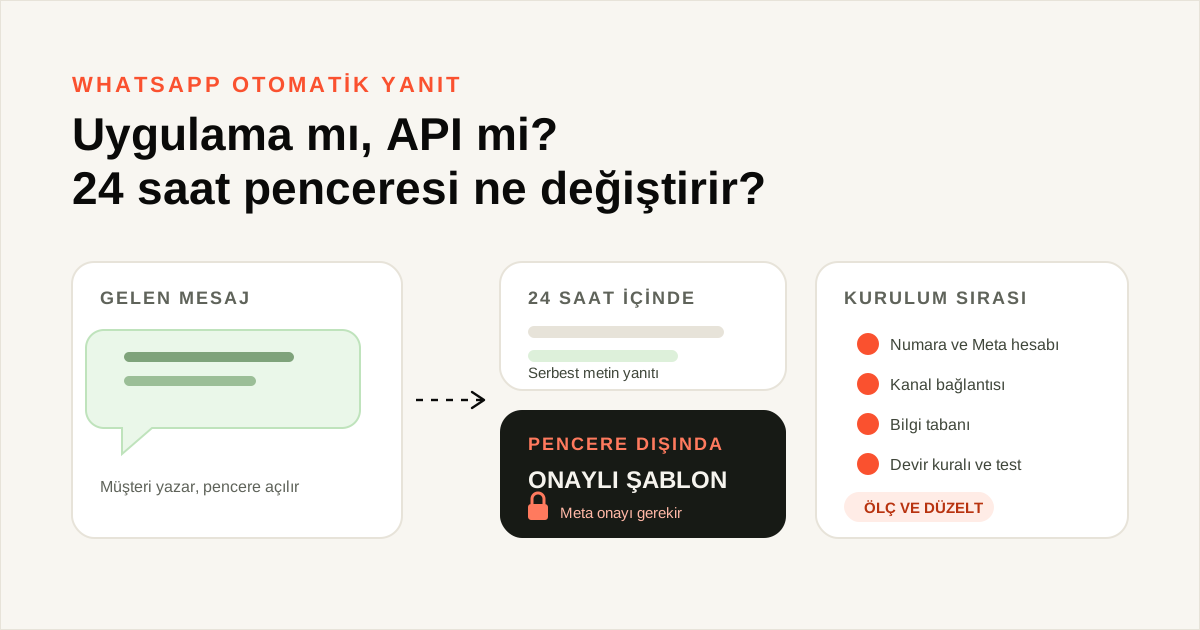
A customer message opens a 24-hour customer service window. Inside that window you can reply with free-form text; the message does not have to be a template. Every new message from the customer reopens the window. Meta defines the rule in its platform documentation [1].
After the window closes, the first business-initiated message must be an approved template. Meta sets the template category, the content rules and the approval. The recipient must also have agreed to receive those messages; sending without consent puts the account at risk. Template approval and message charges sit on Meta's side, so put the approval wait into the setup plan. The WhatsApp platform pricing page lists the current charge items [2].
Who writes the template?
The business writes the template; Meta approves it. Keep the text short, define the variables in advance and make the purpose clear in the first sentence. An informational template written like a marketing message can be rejected on category. Having legal and operations review the same text before submission saves a round of rework.
Approval timing belongs to Meta; this article gives no day count. A rejected template does not always explain itself, and simplifying the text is sometimes the fix. Do not tie the whole setup calendar to one template. Prepare a few backup texts.
What happens outside the window?
A concrete example: a customer orders, the parcel ships, and three days later the business wants to send "your parcel is out for delivery" as free text. It cannot, because the window is closed. An approved shipping template is the only route. If the customer writes again, the window reopens and a free-form reply becomes possible.
The rule also draws the boundary of automation. Inside the window the assistant can hold a conversation. Outside it, the assistant can only trigger a pre-approved text. The expectation "I can send a reminder to any customer at any time" is therefore not realistic.
How do you set up WhatsApp auto-replies in five steps?
The setup has five steps, and the order matters. You can write the knowledge base before the channel is connected, but going live before the knowledge base is ready causes problems. The step most often skipped is writing the handover rule before testing.
- Prepare the number and the Meta account. You need a verified WhatsApp Business number and a Meta Business account. If the number is already connected elsewhere, Meta's screen will not let you select it.
- Connect the channel. In the panel, start a new WhatsApp connection under Connections, choose the assistant that will answer, and select the number on Meta's approval screen. When the connection completes, the channel card shows Connected.
- Write the knowledge base. Add opening hours, address, shipping time, return terms and common questions. Critical facts such as price, returns and warranty should not enter an answer before approval. Do not test until the source status is Ready.
- Define scope and the handover rule. Write down which questions the assistant answers and which it leaves to the team. Name the person who receives the handover notification and the working hours.
- Test and measure. Try real questions from your own number. A draft assistant does not reply to customers; after launch, reserve the first week for measurement.
The sequence is not decoration in WhatsApp auto-replies. Connecting a channel with an empty knowledge base leads the assistant to go quiet on questions it cannot answer. Launching without a handover rule catches the team unprepared; when the first complaint arrives, nobody knows what to do.
Which messages should stay with a person?
The most common mistake is automating every message. Keep these categories human:
- Negotiation, special pricing and discount requests.
- Return disputes, damaged products and legal matters.
- Messages containing personal data: identity, card or health information.
- Complaints that contradict the order record, such as "the parcel arrived but the product is different".
- Custom production, sizing and appointment requests that need a decision.
The list looks short, but in WhatsApp auto-replies it carries a large share of the daily work. The assistant's job is to open the door and route the conversation, not to make the decision. Hand over with a summary, not with "I don't know". The team should see what the customer wants, what remains open and which source the assistant used.
What should you measure?
Five measures are enough to see whether WhatsApp auto-replies work. Keep the numbers in the same weekly table; do not decide on a single day. Measurement should start on day one, because handover reasons are clearest in the first weeks.
| Metric | How to read it | When |
|---|---|---|
| Automated resolution rate | Conversations closed without a person / total | Weekly |
| Human handover rate | Handed-over conversations / total | Weekly |
| Handover reason | Recurring headings in the summaries | Every two weeks |
| First response time | Average per channel | Continuously |
| Template rejection rate | Rejected templates / submitted templates | Monthly |
If the handover rate approaches zero, the assistant may be taking too much risk. If it is very high, the knowledge base is thin or the scope is wrong. When you read the automated resolution rate, do not count only closed conversations. If the same customer returns with the same question, the answer did not close anything.
Which number misleads?
The most misleading metric is "messages answered". A high count does not prove the answers were right. If the WhatsApp auto-replies text sends the customer in the wrong direction, the conversation looks closed but returns as a return request or a complaint. Read the answer count together with handover reasons. A template rejection rate is not bad news on its own either; a rejected template makes a pending approval visible.
Getting started
Before you start, split the last thirty days of messages into three groups: answerable from the knowledge base, needing a flow, and needing a human decision. Those three lists become the draft of both the knowledge base and the handover rule.
To see how the channel behaves today, read the WhatsApp channel page, the setup screens in the WhatsApp setup guide and the technical difference in the WhatsApp Business API guide. The AI customer agent shows how the assistant builds an answer from the knowledge base, and the WhatsApp customer questions guide covers the same questions from the support side; related article: Instagram automatic messages.
Sources
- [1] About the WhatsApp Business Platform — Meta — https://developers.facebook.com/documentation/business-messaging/whatsapp/about-the-platform — Accessed: 14.11.2026
- [2] WhatsApp Business Platform pricing — Meta — https://developers.facebook.com/documentation/business-messaging/whatsapp/pricing — Accessed: 14.11.2026
Frequently asked questions
Are WhatsApp auto-replies free?
Quick replies and greeting messages in the Business app are free; your phone line and data plan are separate costs. On the WhatsApp Business Platform, user-to-business messages are free, while delivered business-to-user template messages are charged under Meta’s rate card. The amount depends on the country and template category, so check Meta’s current pricing page before setup [2].
Is the Business app enough?
If one person handles the number and most questions are about opening hours, address and simple product details, the Business app may be enough. If several people share the number, answers should come from a knowledge base, or order status must be checked, the app is not enough. Those need a connection through the WhatsApp Business Platform: the Business app has no shared inbox, assignment or handover flow, so team access is not possible.
What is the 24-hour rule?
A customer message opens a 24-hour reply window. Inside it you can answer with free-form text. After it closes, the first business-initiated message must be a template approved by Meta. If the customer writes again, the window reopens. The rule exists to prevent unsolicited messaging; Meta sets the template category and approval [1].
How long does template approval take?
Template approval depends on Meta’s own review; this article promises no timeline. Some templates are approved quickly, others are rejected because of category or content and must be corrected and resubmitted. Plan setup around the wait, and do not promise out-of-window messaging before approval arrives. Meta also determines the template category [2].
Do auto-replies remove the human entirely?
It should not. The assistant answers written facts such as hours, address, shipping time and return terms, and hands over with a summary when unsure. Negotiation, special pricing, complaints, return disputes and legal matters stay with a person. After handover the assistant goes quiet and the team takes over. Without this written rule, the assistant either seems to answer everything or hands over every conversation.