Quick answer
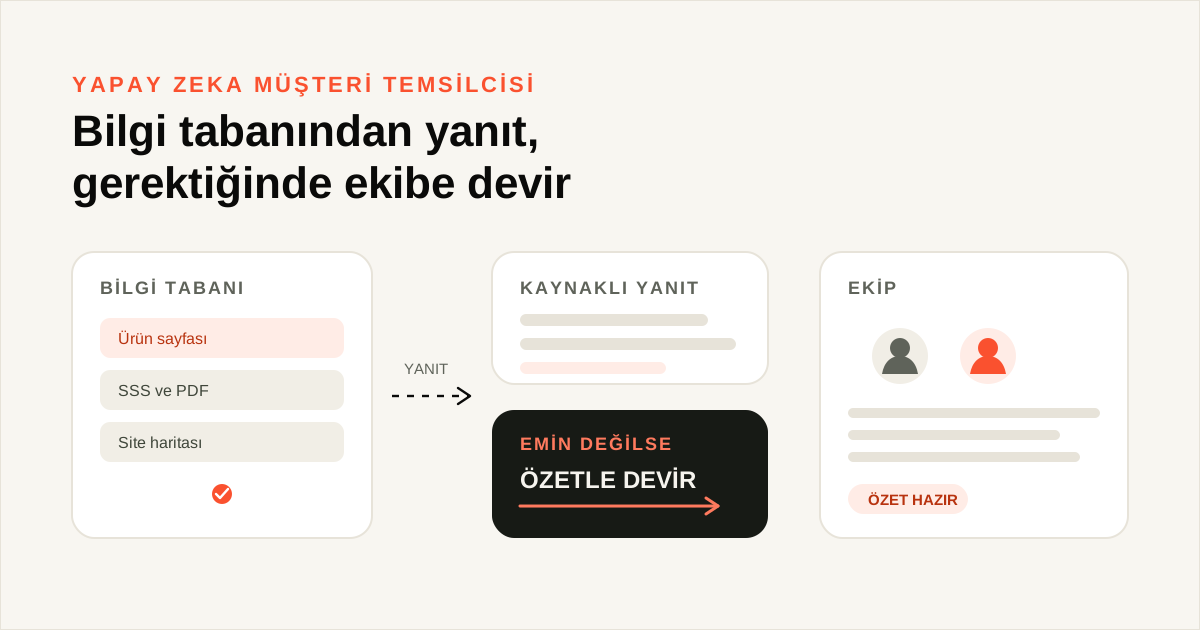
An AI customer agent is a software assistant that answers from your own knowledge base. It does not guess when a source is missing; it hands the conversation to your team with a summary. You decide the channel, the sources and the handover rule.
What is an AI customer agent, exactly?
When a customer writes on WhatsApp or in the website widget, an AI customer agent first searches the knowledge base for an answer. It builds the reply from product pages, frequently asked questions, PDF files and the sitemap. If the answer has no basis in those sources, it does not stretch the conversation. It records what the customer needs, what remains open and which source was checked, then leaves the conversation to the team.
That behaviour is different from the idea of a bot that knows everything. The assistant does not invent a price, a return condition or a delivery time. Price, returns, delivery, warranty and data-protection information cannot enter an answer before approval [3]. A thin knowledge base looks like a bad agent on the first day; the problem is usually the source, not the model. Google Cloud's conversation agent documentation describes an agent connected to knowledge sources and tools [1]. NN/g's chatbot research shows that users want to know they are talking to a bot, which sets their expectations [2].
How does it answer from a knowledge base?
The assistant splits the text in connected sources into sections and uses the section closest to the question. Manual text, PDF files, web pages and sitemaps are the source types; web pages and sitemaps refresh every 24 hours [3]. Content that has not changed is not indexed again. Showing the source under an answer helps the customer check the reply.
What does it do when it is unsure?
The threshold is simple: no source, no answer. The assistant does not close the conversation in that case; it hands it to the team with a handover summary. The summary contains the customer need, the open work, what the assistant tried and the sources it used [3]. The team does not have to read the whole conversation first. After handover the assistant goes quiet; the team can give the conversation back when it has replied. An open conversation stays with the old assistant, and a new assistant only starts on a new conversation.
Which questions does an AI customer agent answer?
| Question type | The agent answers | A person takes over |
|---|---|---|
| Opening hours, address, service list | Yes, if the fact is in the knowledge base | When the fact is missing |
| Where is my order? | If an order source is connected and verification is complete | When there is no source or verification fails |
| Returns and refunds | Explains the return condition and opens a request record | Approval and the refund itself |
| Complaints, exceptions, special pricing | Gives the written facts and states the limit | The decision and the offer |
| Sensitive personal data | Does not collect it; redirects the customer | The team that owns the topic |
As the table shows, the boundary of automation depends on the topic. The job of the assistant is to open the door and route the customer to the right place, not to approve a refund, set a special price or interpret the law. Without a written split, the team and the assistant will behave differently on the same question.
Why does setup have three parts?
Setup is not one "create assistant" button. Three parts complete each other: knowledge, behaviour and channel. When one is missing, the assistant either goes quiet or speaks in the wrong place.
- Prepare the knowledge. Add the website, PDF files, frequently asked questions and manual text. Wait until the source status is Ready; do not start testing with a source that is queued, processing or failed [3].
- Write the behaviour. Define the assistant's role, tone and the topics it should avoid. Approve the critical facts; ticking the approval box is not enough, complete the "add approved items to the knowledge base" step as well [3].
- Connect the channel and test. Assign the assistant to a channel, keep it in draft and try it on the test screen. A draft assistant does not answer customers; it goes live when you publish it [3].
The order matters. Writing behaviour while the knowledge base is empty does not hide what the assistant does not know. A test without a connected channel only checks the screen; it does not show how a real customer message will arrive.
What should you measure?
| Metric | How to read it | How often |
|---|---|---|
| Automated resolution rate | Conversations closed without a person / all conversations | Weekly |
| Human handover rate | Handed-over conversations / all conversations | Weekly |
| Handover reason | Common headings in the summaries | Every two weeks |
| Answer accuracy | Answers not supported by a source | Monthly |
| First response time | Average by channel | Continuously |
None of these metrics is success on its own. If the handover rate approaches zero, the assistant may be taking too much risk. If it is very high, the knowledge base is thin or the scope is wrong. When you read the automated resolution rate, do not count only the conversations that closed; read the reopened ones as well. If the same customer returns with the same question, the answer did not close the issue.
Why does channel choice come before setup?
An AI customer agent can use the same knowledge base on several channels, but the rules of each channel differ. WhatsApp brings a 24-hour window and an approved template, Instagram brings Meta permissions, the web widget brings on-page behaviour, and the phone brings call duration. Skipping this order produces the "let us build the assistant first and choose the channel later" approach; in practice, setup is done twice.
Choose the first channel by question volume and response time. If most incoming questions collect on one channel, starting there shows the gaps in the knowledge base quickly. Before adding a second channel, read the handover reasons from the first one; the same missing fact will appear again. Adding channels does not make an AI customer agent more capable while the knowledge base is unprepared.
An example: in the web widget, "where is my parcel" is handed over when no order source is connected. The same question on WhatsApp gives the same result. Connecting the source once solves both channels. Plan the channel list together with the knowledge and flow list. The handover reasons you learn on the first channel also shape the scope of the second.
Where is the limit?
An AI customer agent is not a magic box. It does not produce an answer on a topic that is absent from the knowledge base; that is a design decision, not a defect. It also does not work the same way on every channel. A voice channel cannot read a link [3], while a written channel can offer one to three verified addresses per answer when link suggestions are on. The rules of the channel, such as the WhatsApp 24-hour window, limit the assistant's behaviour.
The second limit is data responsibility. The assistant produces a conversation record and a summary; storing, accessing and deleting those records is the business's data-protection duty. Instead of building a "compliant" certificate claim, write down which data is processed for which purpose. The third limit is team capacity: without a handover rule, the assistant either appears to answer everything or leaves every conversation to a person. Both reduce the value of automation.
A concrete example: a customer asks on Instagram whether a product is discounted. The assistant reads campaign information from the knowledge base; if a personal discount cannot be defined, it says so and hands the conversation to the sales team. Replying "yes, it is discounted" and giving the wrong price looks faster for a moment; it creates refund and reputation costs later. Test the balance between speed and accuracy with examples like this.
Finally, the scope of the assistant is the business's own decision. Two businesses selling the same product can choose different handover thresholds. What matters is that the chosen threshold is written down and that the team applies the same one.
Getting started
The first step is not a new feature; it is to split the last 30 days of questions into three groups: answerable from the knowledge base, requiring a flow, and needing a human decision. Those three lists become the draft of both the knowledge base and the handover rule. You can see the product's current behaviour on the AI customer agent product page, the source preparation steps in the knowledge base setup guide, and channel examples in answering WhatsApp customer questions. To try it with your own questions, use the 14-day trial page; related articles: AI handover to a human, AI customer agent cost, AI transparency.
Sources
- [1] Customer Experience Agent Studio — Google Cloud — https://cloud.google.com/gemini-enterprise-cx/cx-agent-studio — Accessed: 14.11.2026
- [2] The User Experience of Chatbots — Nielsen Norman Group — https://www.nngroup.com/articles/chatbots/ — Accessed: 14.11.2026
- [3] AI customer agent product page — YanıtLabs — https://yanitlabs.com/en/products/assistant/ — Accessed: 14.11.2026
Frequently asked questions
What is an AI customer agent?
An AI customer agent is a software assistant that answers from the business knowledge base and hands over to the team when it is unsure. It works from connected sources, not a fixed reply list. The business sets the channel, sources and handover rule.
Which questions does it answer?
It answers questions about opening hours, address, services, basic prices and process when those facts are in the knowledge base. If an order source is connected and verification is complete, it can read shipment status. When no source covers the question, it does not guess and hands over.
When does it hand over to a person?
It hands over when the knowledge base has no answer, the customer explicitly asks for a person, or the topic is sensitive. The summary includes the customer need, open work, what the assistant tried and the sources used. The team does not have to read the conversation from the start.
How long does setup take?
Setup time depends on how ready the knowledge base is. Adding sources, approving critical facts and connecting a channel can take several sessions. Writing the questions and the handover rule takes more time than the technical setup; a two-week pilot is a realistic start.
What should be considered under data protection?
The agent produces conversation text and summaries; storing, accessing and deleting that data is the business responsibility. Put in writing which data is processed for which purpose, how long it is kept and who can access it. Review the data inventory with your legal adviser where needed.